Discounted Products
-
 Leo Creation 144 TC Cotton Double Jaipuri Prints Flat Bedsheet(Pack of 1, Blue, Gree, Red, Grey, Light Grey)
Original price was: ₹2,999.00.₹329.00Current price is: ₹329.00.
Leo Creation 144 TC Cotton Double Jaipuri Prints Flat Bedsheet(Pack of 1, Blue, Gree, Red, Grey, Light Grey)
Original price was: ₹2,999.00.₹329.00Current price is: ₹329.00.
-
 Home Garage 210 TC Cotton King Floral Fitted (Elastic) Bedsheet(Pack of 1, Grey)
Original price was: ₹999.00.₹299.00Current price is: ₹299.00.
Home Garage 210 TC Cotton King Floral Fitted (Elastic) Bedsheet(Pack of 1, Grey)
Original price was: ₹999.00.₹299.00Current price is: ₹299.00.
-
 Goodrik 140 TC Cotton Double 3D Printed Flat Bedsheet(Pack of 1, Brown)
Original price was: ₹499.00.₹229.00Current price is: ₹229.00.
Goodrik 140 TC Cotton Double 3D Printed Flat Bedsheet(Pack of 1, Brown)
Original price was: ₹499.00.₹229.00Current price is: ₹229.00.
-
 GLOBALSHOP 350 TC Microfiber Double Floral Flat Bedsheet(Pack of 1, Multicolor)
Original price was: ₹1,250.00.₹263.00Current price is: ₹263.00.
GLOBALSHOP 350 TC Microfiber Double Floral Flat Bedsheet(Pack of 1, Multicolor)
Original price was: ₹1,250.00.₹263.00Current price is: ₹263.00.
-
 RisingStar 250 TC Microfiber King Printed Fitted (Elastic) Bedsheet(Pack of 1, FITTED-ROUND-CIRCLES-PREMIUM)
Original price was: ₹2,299.00.₹299.00Current price is: ₹299.00.
RisingStar 250 TC Microfiber King Printed Fitted (Elastic) Bedsheet(Pack of 1, FITTED-ROUND-CIRCLES-PREMIUM)
Original price was: ₹2,299.00.₹299.00Current price is: ₹299.00.
-
 Home Garage 210 TC Cotton King Floral Fitted (Elastic) Bedsheet(Pack of 1, Fitted Black Green)
Original price was: ₹1,299.00.₹299.00Current price is: ₹299.00.
Home Garage 210 TC Cotton King Floral Fitted (Elastic) Bedsheet(Pack of 1, Fitted Black Green)
Original price was: ₹1,299.00.₹299.00Current price is: ₹299.00.
-
 Home Garage 180 TC Cotton King 3D Printed Flat Bedsheet(Pack of 1, White)
Original price was: ₹999.00.₹229.00Current price is: ₹229.00.
Home Garage 180 TC Cotton King 3D Printed Flat Bedsheet(Pack of 1, White)
Original price was: ₹999.00.₹229.00Current price is: ₹229.00.
-
 Home Sizzler 153 cm (5 ft) Polyester Room Darkening Window Curtain (Pack Of 2)(Floral, Maroon)
Original price was: ₹799.00.₹299.00Current price is: ₹299.00.
Home Sizzler 153 cm (5 ft) Polyester Room Darkening Window Curtain (Pack Of 2)(Floral, Maroon)
Original price was: ₹799.00.₹299.00Current price is: ₹299.00.
-
 Panipat Textile Hub 152.4 cm (5 ft) Polyester Window Curtain (Pack Of 2)(Solid, Aqua)
Original price was: ₹1,899.00.₹299.00Current price is: ₹299.00.
Panipat Textile Hub 152.4 cm (5 ft) Polyester Window Curtain (Pack Of 2)(Solid, Aqua)
Original price was: ₹1,899.00.₹299.00Current price is: ₹299.00.
-
 Home Sizzler 214 cm (7 ft) Polyester Semi Transparent Door Curtain (Pack Of 2)(Floral, Maroon)
Original price was: ₹1,199.00.₹399.00Current price is: ₹399.00.
Home Sizzler 214 cm (7 ft) Polyester Semi Transparent Door Curtain (Pack Of 2)(Floral, Maroon)
Original price was: ₹1,199.00.₹399.00Current price is: ₹399.00.
-
 Home Sizzler 153 cm (5 ft) Polyester Room Darkening Window Curtain (Pack Of 2)(Floral, Brown)
Original price was: ₹799.00.₹299.00Current price is: ₹299.00.
Home Sizzler 153 cm (5 ft) Polyester Room Darkening Window Curtain (Pack Of 2)(Floral, Brown)
Original price was: ₹799.00.₹299.00Current price is: ₹299.00.
-
 Stella Creations 214 cm (7 ft) Polyester Room Darkening Door Curtain (Pack Of 2)(Abstract, Brown)
Original price was: ₹1,299.00.₹449.00Current price is: ₹449.00.
Stella Creations 214 cm (7 ft) Polyester Room Darkening Door Curtain (Pack Of 2)(Abstract, Brown)
Original price was: ₹1,299.00.₹449.00Current price is: ₹449.00.
-
 Homefab India 152.5 cm (5 ft) Polyester Room Darkening Window Curtain (Pack Of 2)(Floral, Light Blue)
Original price was: ₹1,199.00.₹319.00Current price is: ₹319.00.
Homefab India 152.5 cm (5 ft) Polyester Room Darkening Window Curtain (Pack Of 2)(Floral, Light Blue)
Original price was: ₹1,199.00.₹319.00Current price is: ₹319.00.
-
 Urban Home 214 cm (7 ft) PVC Transparent Door Curtain Single Curtain(Solid, Off White)
Original price was: ₹699.00.₹203.00Current price is: ₹203.00.
Urban Home 214 cm (7 ft) PVC Transparent Door Curtain Single Curtain(Solid, Off White)
Original price was: ₹699.00.₹203.00Current price is: ₹203.00.
-
 Panipat Textile Hub 213 cm (7 ft) Polyester Door Curtain (Pack Of 2)(Solid, Brown)
Original price was: ₹1,199.00.₹349.00Current price is: ₹349.00.
Panipat Textile Hub 213 cm (7 ft) Polyester Door Curtain (Pack Of 2)(Solid, Brown)
Original price was: ₹1,199.00.₹349.00Current price is: ₹349.00.
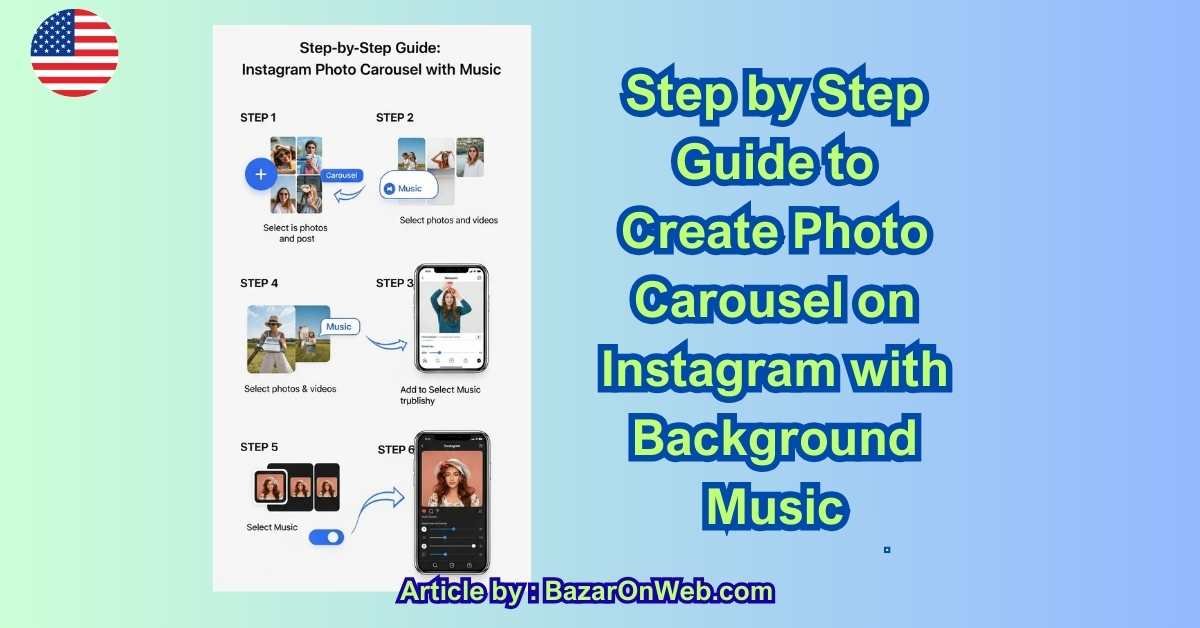
Introduction
On Instagram, attention is no longer won by visuals alone—it’s won by experience. As scrolling behavior becomes faster and more selective, static photo posts often get skipped unless they offer something more immersive. That’s where photo carousels with background music quietly stand out.
Music changes how content is felt. It slows the scroll, sets a mood, and adds emotional context to images that might otherwise feel ordinary. A simple set of photos can suddenly feel cinematic, intentional, and memorable—all without turning into a full video or Reel.
What makes this format especially powerful is its balance. It doesn’t demand the energy of constant video creation, yet it delivers deeper engagement than single-image posts. For creators, professionals, and businesses alike, music-enabled carousels have become a smart way to tell stories, showcase progress, and build connection without overwhelming the audience.
This guide focuses on the practical, step-by-step process of creating a photo carousel with background music—along with the strategic thinking that makes the format work. Whether you’re posting for personal expression or brand growth, understanding how to use this feature intentionally can significantly elevate how your content is experienced.
Creating a photo carousel on Instagram with background music is one of the most effective ways to tell a story, showcase a brand, or share personal moments in a way that feels immersive and emotional. I use this format regularly because it combines visuals, rhythm, and mood—something single-photo posts often fail to deliver.
This guide walks you through the exact process, from preparation to publishing, along with creator-level tips that help your carousel perform better in 2026’s algorithm environment.
Understanding What a Music-Enabled Carousel Is
A photo carousel with background music is a multi-image Instagram post where:
-
Users swipe through multiple photos
-
A single music track plays automatically
-
The audio applies to the entire carousel
-
Music enhances storytelling rather than overpowering visuals
This feature sits between static posts and Reels—it’s calmer than video but more engaging than plain images.
Who Should Use Photo Carousels with Music
This format works exceptionally well for:
-
Personal brands and creators
-
Small businesses and startups
-
Coaches, educators, and consultants
-
Lifestyle, travel, and parenting accounts
-
Product showcases and before–after stories
If your content relies on emotion, progression, or narrative, music-backed carousels are a perfect fit.
Step 1: Update and Prepare Your Instagram App
Before anything else, make sure:
-
Your Instagram app is updated to the latest version
-
You’re logged into the correct account (business or personal)
-
Your account has access to the Music feature (region-dependent)
Instagram rolls out features gradually, so older app versions may not show the music option for photo posts.
Step 2: Plan the Story of Your Carousel
I always plan before uploading. Ask yourself:
-
What story am I telling from slide 1 to slide last?
-
What emotion should the music support—calm, excitement, nostalgia, confidence?
-
Where should attention peak—middle or end?
A strong structure looks like this:
-
Hook image – stops the scroll
-
Context image – explains what’s happening
-
Detail image(s) – adds depth
-
Highlight image – emotional or visual peak
-
Closing image – takeaway or call-to-action
Music works best when visuals flow logically.
Step 3: Select and Prepare Your Photos
Instagram allows up to 10 photos per carousel, but I usually stick to 5–7 for better completion rates.
Best practices:
-
Use consistent lighting or color tones
-
Avoid mixing vertical and horizontal images
-
Edit photos beforehand (Instagram is not an editor)
-
Keep text overlays minimal
Remember: the music already adds stimulation—don’t overload visually.
Step 4: Start Creating the Carousel
Now move into the app:
-
Tap the “+” icon
-
Select Post
-
Tap Select Multiple
-
Choose your photos in the order you want them displayed
-
Tap Next
At this stage, you are still creating a standard carousel.
Step 5: Add Background Music to the Carousel
This is the most important step—and the one many people miss.
After selecting photos and tapping Next:
-
Look at the top of the screen
-
Tap the Music icon 🎵
-
Browse trending tracks or search by mood, artist, or song name
-
Select the track
-
Choose the exact segment of the song
-
Adjust the duration (Instagram auto-matches to carousel length)
Once selected, the music applies to the entire carousel post.
Step 6: Adjust Music Mood and Timing
Music selection is not about popularity—it’s about alignment.
Tips I follow:
-
Calm visuals → acoustic, lo-fi, instrumental
-
Brand/product posts → soft upbeat tracks
-
Emotional stories → piano, slow vocals
-
Educational posts → subtle background music only
Avoid:
-
Loud bass-heavy tracks
-
Lyrics that clash with your message
-
Overused viral sounds that distract
Music should support, not dominate.
Step 7: Apply Consistent Edits (Light Touch Only)
After music selection:
-
Use the same filter on all photos (or none)
-
Adjust brightness and warmth lightly
-
Avoid heavy effects—music already creates depth
Consistency keeps the carousel feeling intentional and professional.
Step 8: Write a Caption That Works With Music
Music adds emotion, so your caption should complement it.
I usually structure captions like this:
-
First line: emotional or curiosity-driven hook
-
Middle: context or short story
-
End: soft CTA (save, reflect, comment)
Examples of soft CTAs:
-
“Swipe through with sound on 🎶”
-
“This moment deserved music.”
-
“Which slide spoke to you most?”
Avoid hard selling in music-based carousels.
Step 9: Choose Hashtags Strategically
Don’t overdo hashtags. I use 5–8 max.
Mix:
-
Niche hashtags
-
Content-type hashtags
-
Emotion-based hashtags
Example mix:
-
#InstagramCarousel
-
#StorytellingContent
-
#VisualBranding
-
#CreativePosts
Hashtags help discovery, but saves and completion rate matter more.
Step 10: Publish at the Right Time
For carousels with music, timing matters because they rely on attention.
Best-performing windows (from my experience):
-
Early morning (7–9 AM)
-
Evening wind-down (7–10 PM)
Avoid rushed scrolling hours like mid-workday unless your audience is global.
How Instagram Algorithm Treats Music Carousels
Instagram favors this format because:
-
Users spend more time on the post
-
Swiping increases session duration
-
Music triggers emotional retention
-
Saves increase significantly
Key metrics Instagram tracks:
-
Time spent on post
-
Completion rate (did they swipe all slides?)
-
Saves and shares
-
Replays with sound on
Music increases all four when used properly.
Common Mistakes to Avoid
I see these mistakes constantly:
-
Adding music that doesn’t match visuals
-
Uploading random photo order
-
Using loud music for text-heavy slides
-
Ignoring sound balance
-
Overposting music carousels back-to-back
Music-enhanced posts should feel intentional, not gimmicky.
Carousel vs Reel with Music: When to Choose What
Choose a carousel with music when:
-
You want calm engagement
-
Content is reflective or educational
-
You want saves and shares
Choose a Reel when:
-
Movement is essential
-
You want reach and virality
-
You’re following trends
Both formats have their place—I use both strategically.
Business & Creator Use Cases That Perform Well
Some of the best-performing carousel-with-music ideas:
-
Brand journey timelines
-
Client transformation stories
-
Behind-the-scenes moments
-
Event highlights
-
Product storytelling
-
Parenting or lifestyle moments
Music humanizes brand content dramatically.
Can You Add Music After Posting?
No.
Once a carousel is published:
-
Music cannot be added later
-
You must delete and re-upload to include music
That’s why previewing before posting is critical.
Copyright and Music Usage Notes
Instagram provides licensed music through its library, so:
-
You’re safe using in-app tracks
-
Avoid uploading external copyrighted audio
-
Business accounts may see limited music options
If you manage a business profile under Meta, available tracks may vary by region and category.
Accessibility Tip (Very Important)
Not everyone listens with sound.
Always ensure:
-
Visuals make sense without music
-
Text overlays are readable
-
Meaning isn’t lost when muted
Music should enhance—not replace—communication.
Final Practical Advice I Personally Follow
I treat music carousels as digital mood boards.
I don’t post them daily. I post them when:
-
The story deserves emotional depth
-
The visuals are strong enough
-
The message benefits from rhythm
When done right, a photo carousel with background music feels less like content—and more like a moment someone chooses to stay with.
Conclusion
Photo carousels with background music sit in a very interesting space on Instagram—they’re quiet but powerful. They don’t shout for attention the way trending Reels do, yet they consistently earn saves, longer view time, and thoughtful engagement. That’s because they invite people to stay rather than rush past.
What I’ve learned from using this format is that success doesn’t come from complexity. It comes from alignment—between images, music, timing, and message. When those elements work together, even simple moments feel meaningful. And when something feels meaningful, people remember it.
This format is especially valuable for creators and brands who want to communicate depth without noise. You don’t need fast cuts, heavy text, or aggressive hooks. You need clarity, consistency, and intention. Music becomes the emotional glue that holds the carousel together.
At the same time, restraint matters. Not every post needs music, and not every story benefits from added emotion. The strongest content comes from choosing this format deliberately—when the visuals and message truly deserve an extra layer of feeling.
As Instagram continues to prioritize time spent and genuine interaction, formats that encourage slow, thoughtful engagement will only grow more valuable. Music-backed carousels do exactly that. Used well, they don’t just showcase content—they create moments people choose to experience.
Disclaimer
This guide is for educational and informational purposes only. Instagram features, interface options, and music availability may vary by region, account type, and future platform updates. Always refer to official Instagram support documentation for the most current functionality.

- 7 Best Methods to Fix “Undoing Changes Made to Your PC” Error (Complete Guide)

- How to Turn On Spam Blocker on Android: Stop Unwanted Calls and Messages Easily

- Can’t View Comments on YouTube Shorts? 6 Ways to Fix It (Complete Guide)

- How to Block Users From Installing Programs in Windows 11 Complete Step-by-Step Guide for Better Security

- How to Fix Chrome Automatically Deleting Downloaded Files (Complete Step-by-Step Guide)

Products
-
![Apple Watch Ultra 3 [GPS + Cellular 49mm] Running & Multisport Smartwatch w/Rugged Titanium Case w/Black Titanium Milanese Loop - M. Satellite Communications, Advanced Health & Fitness Tracking](https://bazaronweb.com/retailstores/wp-content/uploads/2025/09/apple-watch-320x320.jpg) Apple Watch Ultra 3 [GPS + Cellular 49mm] Running & Multisport Smartwatch w/Rugged Titanium Case w/Black Titanium Milanese Loop - M. Satellite Communications, Advanced Health & Fitness Tracking
Apple Watch Ultra 3 [GPS + Cellular 49mm] Running & Multisport Smartwatch w/Rugged Titanium Case w/Black Titanium Milanese Loop - M. Satellite Communications, Advanced Health & Fitness Tracking
-
 Apple iPad mini (A17 Pro): Apple Intelligence, 8.3-inch Liquid Retina Display, 256GB, Wi-Fi 6E, 12MP Front/12MP Back Camera, Touch ID, All-Day Battery Life — Purple
-
 Apple AirPods Max Wireless Over-Ear Headphones, Active Noise Cancelling, Transparency Mode, Personalized Spatial Audio, Dolby Atmos, Bluetooth Headphones for iPhone – Space Gray
-
 Apple AirPods Pro 2 Wireless Earbuds, Active Noise Cancellation, Hearing Aid Feature, Bluetooth Headphones, Transparency, Personalized Spatial Audio, High-Fidelity Sound, H2 Chip, USB-C Charging
-
Leo Creation 144 TC Cotton Double Jaipuri Prints Flat Bedsheet(Pack of 1, Blue, Gree, Red, Grey, Light Grey)
Original price was: ₹2,999.00.₹329.00Current price is: ₹329.00.
Leave a Reply