Discounted Products
-
 Leo Creation 144 TC Cotton Double Jaipuri Prints Flat Bedsheet(Pack of 1, Blue, Gree, Red, Grey, Light Grey)
Original price was: ₹2,999.00.₹329.00Current price is: ₹329.00.
Leo Creation 144 TC Cotton Double Jaipuri Prints Flat Bedsheet(Pack of 1, Blue, Gree, Red, Grey, Light Grey)
Original price was: ₹2,999.00.₹329.00Current price is: ₹329.00.
-
 Home Garage 210 TC Cotton King Floral Fitted (Elastic) Bedsheet(Pack of 1, Grey)
Original price was: ₹999.00.₹299.00Current price is: ₹299.00.
Home Garage 210 TC Cotton King Floral Fitted (Elastic) Bedsheet(Pack of 1, Grey)
Original price was: ₹999.00.₹299.00Current price is: ₹299.00.
-
 Goodrik 140 TC Cotton Double 3D Printed Flat Bedsheet(Pack of 1, Brown)
Original price was: ₹499.00.₹229.00Current price is: ₹229.00.
Goodrik 140 TC Cotton Double 3D Printed Flat Bedsheet(Pack of 1, Brown)
Original price was: ₹499.00.₹229.00Current price is: ₹229.00.
-
 GLOBALSHOP 350 TC Microfiber Double Floral Flat Bedsheet(Pack of 1, Multicolor)
Original price was: ₹1,250.00.₹263.00Current price is: ₹263.00.
GLOBALSHOP 350 TC Microfiber Double Floral Flat Bedsheet(Pack of 1, Multicolor)
Original price was: ₹1,250.00.₹263.00Current price is: ₹263.00.
-
 RisingStar 250 TC Microfiber King Printed Fitted (Elastic) Bedsheet(Pack of 1, FITTED-ROUND-CIRCLES-PREMIUM)
Original price was: ₹2,299.00.₹299.00Current price is: ₹299.00.
RisingStar 250 TC Microfiber King Printed Fitted (Elastic) Bedsheet(Pack of 1, FITTED-ROUND-CIRCLES-PREMIUM)
Original price was: ₹2,299.00.₹299.00Current price is: ₹299.00.
-
 Home Garage 210 TC Cotton King Floral Fitted (Elastic) Bedsheet(Pack of 1, Fitted Black Green)
Original price was: ₹1,299.00.₹299.00Current price is: ₹299.00.
Home Garage 210 TC Cotton King Floral Fitted (Elastic) Bedsheet(Pack of 1, Fitted Black Green)
Original price was: ₹1,299.00.₹299.00Current price is: ₹299.00.
-
 Home Garage 180 TC Cotton King 3D Printed Flat Bedsheet(Pack of 1, White)
Original price was: ₹999.00.₹229.00Current price is: ₹229.00.
Home Garage 180 TC Cotton King 3D Printed Flat Bedsheet(Pack of 1, White)
Original price was: ₹999.00.₹229.00Current price is: ₹229.00.
-
 Home Sizzler 153 cm (5 ft) Polyester Room Darkening Window Curtain (Pack Of 2)(Floral, Maroon)
Original price was: ₹799.00.₹299.00Current price is: ₹299.00.
Home Sizzler 153 cm (5 ft) Polyester Room Darkening Window Curtain (Pack Of 2)(Floral, Maroon)
Original price was: ₹799.00.₹299.00Current price is: ₹299.00.
-
 Panipat Textile Hub 152.4 cm (5 ft) Polyester Window Curtain (Pack Of 2)(Solid, Aqua)
Original price was: ₹1,899.00.₹299.00Current price is: ₹299.00.
Panipat Textile Hub 152.4 cm (5 ft) Polyester Window Curtain (Pack Of 2)(Solid, Aqua)
Original price was: ₹1,899.00.₹299.00Current price is: ₹299.00.
-
 Home Sizzler 214 cm (7 ft) Polyester Semi Transparent Door Curtain (Pack Of 2)(Floral, Maroon)
Original price was: ₹1,199.00.₹399.00Current price is: ₹399.00.
Home Sizzler 214 cm (7 ft) Polyester Semi Transparent Door Curtain (Pack Of 2)(Floral, Maroon)
Original price was: ₹1,199.00.₹399.00Current price is: ₹399.00.
-
 Home Sizzler 153 cm (5 ft) Polyester Room Darkening Window Curtain (Pack Of 2)(Floral, Brown)
Original price was: ₹799.00.₹299.00Current price is: ₹299.00.
Home Sizzler 153 cm (5 ft) Polyester Room Darkening Window Curtain (Pack Of 2)(Floral, Brown)
Original price was: ₹799.00.₹299.00Current price is: ₹299.00.
-
 Stella Creations 214 cm (7 ft) Polyester Room Darkening Door Curtain (Pack Of 2)(Abstract, Brown)
Original price was: ₹1,299.00.₹449.00Current price is: ₹449.00.
Stella Creations 214 cm (7 ft) Polyester Room Darkening Door Curtain (Pack Of 2)(Abstract, Brown)
Original price was: ₹1,299.00.₹449.00Current price is: ₹449.00.
-
 Homefab India 152.5 cm (5 ft) Polyester Room Darkening Window Curtain (Pack Of 2)(Floral, Light Blue)
Original price was: ₹1,199.00.₹319.00Current price is: ₹319.00.
Homefab India 152.5 cm (5 ft) Polyester Room Darkening Window Curtain (Pack Of 2)(Floral, Light Blue)
Original price was: ₹1,199.00.₹319.00Current price is: ₹319.00.
-
 Urban Home 214 cm (7 ft) PVC Transparent Door Curtain Single Curtain(Solid, Off White)
Original price was: ₹699.00.₹203.00Current price is: ₹203.00.
Urban Home 214 cm (7 ft) PVC Transparent Door Curtain Single Curtain(Solid, Off White)
Original price was: ₹699.00.₹203.00Current price is: ₹203.00.
-
 Panipat Textile Hub 213 cm (7 ft) Polyester Door Curtain (Pack Of 2)(Solid, Brown)
Original price was: ₹1,199.00.₹349.00Current price is: ₹349.00.
Panipat Textile Hub 213 cm (7 ft) Polyester Door Curtain (Pack Of 2)(Solid, Brown)
Original price was: ₹1,199.00.₹349.00Current price is: ₹349.00.
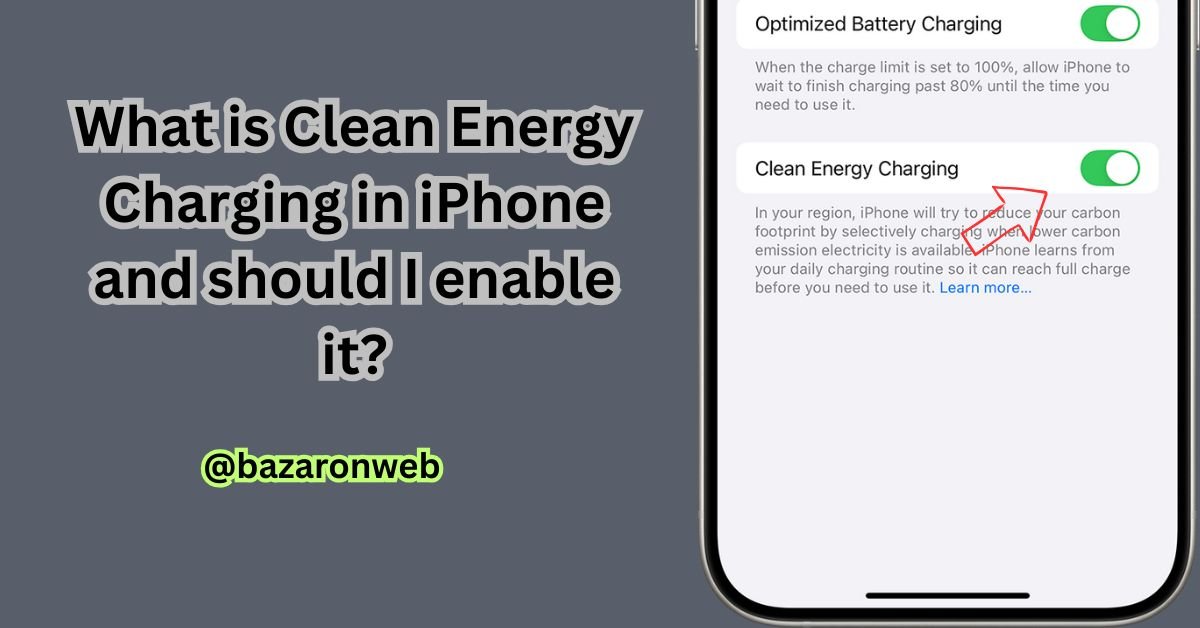
Clean Energy Charging on iPhone: A Simple Guide to a Greener Charge
In our modern world, we’re all becoming more conscious of our carbon footprint. We recycle, we carry reusable bags, and maybe we even think about the energy that powers our homes. But have you ever stopped to think about the carbon footprint of charging your iPhone?
It might seem like a small thing, but with billions of smartphones in use, the collective energy demand is significant. This is precisely the problem Apple set out to address with a feature called Clean Energy Charging.
If you’ve seen a notification on your iPhone about “Charging on hold until cleaner energy is available” and been momentarily confused, you’re not alone. Let’s break down what this feature really is, how it works, and the practical question: should you enable it?
What Is Clean Energy Charging? The Core Concept
In the simplest terms, Clean Energy Charging is a feature designed to reduce your iPhone’s carbon footprint by selectively charging when lower-carbon electricity is available on your local power grid.
Think of the electrical grid like a shared kitchen with several different cooks (power sources). Sometimes, the main cooks are “clean” ones like wind turbines and solar farms. At other times, especially during peak demand, the grid has to call in backup cooks that use “dirtier” fuels like coal or natural gas to meet the high energy load.
Clean Energy Charging allows your iPhone to act like a smart kitchen manager. It tries to schedule the “cooking” (charging) for times when the clean cooks are primarily at work.
Here’s the technical magic behind it:
-
Location Learning: Your iPhone uses on-device learning to understand your typical charging routine (e.g., you plug in at night at home and maybe at your office desk during the day).
-
Carbon Forecast: It receives a forecast of the carbon emissions for your local energy grid. This data is sourced from your region’s electricity provider.
-
Smart Scheduling: When you plug in your phone at a location it recognizes (like your home), it can pause charging during periods of high carbon-intensive electricity and automatically resume when cleaner energy sources become available.
The goal is not to prevent you from getting a full charge, but to time that charge in a way that is more environmentally friendly.
How It Works Hand-in-Hand with Optimized Battery Charging
If Clean Energy Charging sounds familiar, that’s because it’s the eco-conscious cousin of Optimized Battery Charging. It’s helpful to understand how they work as a team.
-
Optimized Battery Charging is focused on your phone’s health. It learns your routine to avoid keeping your battery at 100% for extended periods, thereby slowing its chemical aging.
-
Clean Energy Charging is focused on the planet’s health. It uses a similar understanding of your routine to time the charging process for when the grid is greener.
In practice, you will often see them work together. A notification on your Lock Screen might say: “Charging on hold until [Time] with Clean Energy Charging and Optimized Battery Charging.” This means the pause is both to protect your battery and to wait for a cleaner energy mix.
The Big Question: Should You Enable Clean Energy Charging?
This is a personal decision that balances environmental values with a need for predictability. Let’s weigh the pros and cons to help you decide.
The Case FOR Enabling It (The Pros)
-
It’s an Effortless Way to Reduce Your Carbon Footprint: This is the primary benefit. For anyone looking for simple, automated ways to live more sustainably, this is a perfect “set it and forget it” feature. You contribute to lowering collective demand on carbon-intensive power sources without having to change your own behavior.
-
It Leverages Real, Local Data: This isn’t a vague, global initiative. The feature uses specific carbon emission data for your regional power grid, making its impact direct and tangible.
-
It Raises Awareness: Simply seeing the notification makes you more conscious of the energy you use. It’s a small but constant reminder that our daily habits are connected to a larger system, fostering a more mindful approach to technology.
-
It Doesn’t Stop You From Getting a Full Charge: The system is designed to ensure your phone is still fully charged by the time you typically unplug it. If you have a predictable schedule, you should never be inconvenienced.
The Case for CAUTION or Disabling It (The Cons)
-
It Requires a Predictable Routine: Just like Optimized Battery Charging, this feature relies heavily on learning your patterns. If your schedule is highly variable—you work night shifts, have an on-call job, or travel frequently—the algorithm may make incorrect assumptions. The last thing you need is a half-charged phone when you have an unexpected early start.
-
It Can Feel Like a Loss of Control: We are used to our devices doing what we tell them, when we tell them. The idea of your iPhone deciding not to charge, even for a good reason, can be frustrating for some users who want immediate, predictable results.
-
Potential for Confusion: The notifications, while informative, can be misunderstood. Many users initially think it’s a problem with their charger, cable, or outlet, leading to unnecessary worry.
-
Limited Impact on an Individual Level: It’s important to be realistic. The carbon reduction from a single iPhone is minuscule. The real benefit comes from widespread adoption. If you are someone who needs absolute charging reliability, you might question the trade-off for such a small personal impact.
How to Manage Clean Energy Charging
The feature is designed to be easily managed. Here’s how to find it and control it.
To Enable or Disable the Feature:
-
Go to Settings.
-
Tap Battery.
-
Tap Battery Health & Charging.
-
Here, you will find the toggle for Clean Energy Charging. You can turn it on or off as you wish.
If You Need to Override a Charging Pause:
When the feature is active and has paused your charging, you will see a notification on your Lock Screen.
-
To charge immediately, simply touch and hold the notification and tap “Charge Now.”
-
This will override the pause for that specific charging session without disabling the feature for the future.
The Final Verdict: Who Is This For?
After understanding the mechanics and the trade-offs, here’s my practical advice:
You should enable Clean Energy Charging if:
-
You have a relatively predictable daily or weekly routine.
-
You are environmentally conscious and want to leverage technology for sustainable living.
-
You primarily charge your phone overnight or for long, uninterrupted periods.
-
You trust automated systems and don’t mind a slight lack of immediacy for a greater good.
You should consider disabling Clean Energy Charging if:
-
Your schedule is highly erratic and unpredictable.
-
You frequently need the ability to get a quick, full charge on a moment’s notice (e.g., for on-call work or spontaneous travel).
-
The feeling of your phone not charging when plugged in causes you more anxiety than the environmental benefit provides.
-
You live in a region with a very stable, clean energy grid (like hydropower or nuclear), making the feature’s impact less pronounced.
Ultimately, Clean Energy Charging is a thoughtful, forward-thinking feature from Apple. It represents a shift towards more intelligent and responsible device management. For the majority of users with standard routines, enabling it is a simple, positive choice for the planet. But it’s also perfectly reasonable to prioritize reliability and predictability by turning it off. The power, quite literally, is in your hands.

- How to Block Users From Installing Programs in Windows 11 Complete Step-by-Step Guide for Better Security

- How to Fix Chrome Automatically Deleting Downloaded Files (Complete Step-by-Step Guide)

- How to View Apps That Windows Security Identifies as PUA (Step-by-Step Guide)

- How to Add Custom DNS Server on iPhone to Fix DNS Errors and Improve Internet Speed

- AI Automation in 2026: How It’s Transforming Jobs, Businesses, and Everyday Life

Products
-
![Apple Watch Ultra 3 [GPS + Cellular 49mm] Running & Multisport Smartwatch w/Rugged Titanium Case w/Black Titanium Milanese Loop - M. Satellite Communications, Advanced Health & Fitness Tracking](https://bazaronweb.com/retailstores/wp-content/uploads/2025/09/apple-watch-320x320.jpg) Apple Watch Ultra 3 [GPS + Cellular 49mm] Running & Multisport Smartwatch w/Rugged Titanium Case w/Black Titanium Milanese Loop - M. Satellite Communications, Advanced Health & Fitness Tracking
Apple Watch Ultra 3 [GPS + Cellular 49mm] Running & Multisport Smartwatch w/Rugged Titanium Case w/Black Titanium Milanese Loop - M. Satellite Communications, Advanced Health & Fitness Tracking
-
 Apple iPad mini (A17 Pro): Apple Intelligence, 8.3-inch Liquid Retina Display, 256GB, Wi-Fi 6E, 12MP Front/12MP Back Camera, Touch ID, All-Day Battery Life — Purple
-
 Apple AirPods Max Wireless Over-Ear Headphones, Active Noise Cancelling, Transparency Mode, Personalized Spatial Audio, Dolby Atmos, Bluetooth Headphones for iPhone – Space Gray
-
 Apple AirPods Pro 2 Wireless Earbuds, Active Noise Cancellation, Hearing Aid Feature, Bluetooth Headphones, Transparency, Personalized Spatial Audio, High-Fidelity Sound, H2 Chip, USB-C Charging
-
Leo Creation 144 TC Cotton Double Jaipuri Prints Flat Bedsheet(Pack of 1, Blue, Gree, Red, Grey, Light Grey)
Original price was: ₹2,999.00.₹329.00Current price is: ₹329.00.
Leave a Reply