Discounted Products
-
 Home Garage 210 TC Cotton King Floral Fitted (Elastic) Bedsheet(Pack of 1, Grey)
Original price was: ₹999.00.₹299.00Current price is: ₹299.00.
Home Garage 210 TC Cotton King Floral Fitted (Elastic) Bedsheet(Pack of 1, Grey)
Original price was: ₹999.00.₹299.00Current price is: ₹299.00.
-
 Goodrik 140 TC Cotton Double 3D Printed Flat Bedsheet(Pack of 1, Brown)
Original price was: ₹499.00.₹229.00Current price is: ₹229.00.
Goodrik 140 TC Cotton Double 3D Printed Flat Bedsheet(Pack of 1, Brown)
Original price was: ₹499.00.₹229.00Current price is: ₹229.00.
-
 GLOBALSHOP 350 TC Microfiber Double Floral Flat Bedsheet(Pack of 1, Multicolor)
Original price was: ₹1,250.00.₹263.00Current price is: ₹263.00.
GLOBALSHOP 350 TC Microfiber Double Floral Flat Bedsheet(Pack of 1, Multicolor)
Original price was: ₹1,250.00.₹263.00Current price is: ₹263.00.
-
 RisingStar 250 TC Microfiber King Printed Fitted (Elastic) Bedsheet(Pack of 1, FITTED-ROUND-CIRCLES-PREMIUM)
Original price was: ₹2,299.00.₹299.00Current price is: ₹299.00.
RisingStar 250 TC Microfiber King Printed Fitted (Elastic) Bedsheet(Pack of 1, FITTED-ROUND-CIRCLES-PREMIUM)
Original price was: ₹2,299.00.₹299.00Current price is: ₹299.00.
-
 Home Garage 210 TC Cotton King Floral Fitted (Elastic) Bedsheet(Pack of 1, Fitted Black Green)
Original price was: ₹1,299.00.₹299.00Current price is: ₹299.00.
Home Garage 210 TC Cotton King Floral Fitted (Elastic) Bedsheet(Pack of 1, Fitted Black Green)
Original price was: ₹1,299.00.₹299.00Current price is: ₹299.00.
-
 Home Garage 180 TC Cotton King 3D Printed Flat Bedsheet(Pack of 1, White)
Original price was: ₹999.00.₹229.00Current price is: ₹229.00.
Home Garage 180 TC Cotton King 3D Printed Flat Bedsheet(Pack of 1, White)
Original price was: ₹999.00.₹229.00Current price is: ₹229.00.
-
 Panipat Textile Hub 152.4 cm (5 ft) Polyester Window Curtain (Pack Of 2)(Solid, Aqua)
Original price was: ₹1,899.00.₹299.00Current price is: ₹299.00.
Panipat Textile Hub 152.4 cm (5 ft) Polyester Window Curtain (Pack Of 2)(Solid, Aqua)
Original price was: ₹1,899.00.₹299.00Current price is: ₹299.00.
-
 Home Sizzler 214 cm (7 ft) Polyester Semi Transparent Door Curtain (Pack Of 2)(Floral, Maroon)
Original price was: ₹1,199.00.₹399.00Current price is: ₹399.00.
Home Sizzler 214 cm (7 ft) Polyester Semi Transparent Door Curtain (Pack Of 2)(Floral, Maroon)
Original price was: ₹1,199.00.₹399.00Current price is: ₹399.00.
-
 Home Sizzler 153 cm (5 ft) Polyester Room Darkening Window Curtain (Pack Of 2)(Floral, Brown)
Original price was: ₹799.00.₹299.00Current price is: ₹299.00.
Home Sizzler 153 cm (5 ft) Polyester Room Darkening Window Curtain (Pack Of 2)(Floral, Brown)
Original price was: ₹799.00.₹299.00Current price is: ₹299.00.
-
 Stella Creations 214 cm (7 ft) Polyester Room Darkening Door Curtain (Pack Of 2)(Abstract, Brown)
Original price was: ₹1,299.00.₹449.00Current price is: ₹449.00.
Stella Creations 214 cm (7 ft) Polyester Room Darkening Door Curtain (Pack Of 2)(Abstract, Brown)
Original price was: ₹1,299.00.₹449.00Current price is: ₹449.00.
-
 Homefab India 152.5 cm (5 ft) Polyester Room Darkening Window Curtain (Pack Of 2)(Floral, Light Blue)
Original price was: ₹1,199.00.₹319.00Current price is: ₹319.00.
Homefab India 152.5 cm (5 ft) Polyester Room Darkening Window Curtain (Pack Of 2)(Floral, Light Blue)
Original price was: ₹1,199.00.₹319.00Current price is: ₹319.00.
-
 Urban Home 214 cm (7 ft) PVC Transparent Door Curtain Single Curtain(Solid, Off White)
Original price was: ₹699.00.₹203.00Current price is: ₹203.00.
Urban Home 214 cm (7 ft) PVC Transparent Door Curtain Single Curtain(Solid, Off White)
Original price was: ₹699.00.₹203.00Current price is: ₹203.00.
-
 Panipat Textile Hub 213 cm (7 ft) Polyester Door Curtain (Pack Of 2)(Solid, Brown)
Original price was: ₹1,199.00.₹349.00Current price is: ₹349.00.
Panipat Textile Hub 213 cm (7 ft) Polyester Door Curtain (Pack Of 2)(Solid, Brown)
Original price was: ₹1,199.00.₹349.00Current price is: ₹349.00.
-
 Home Sizzler 214 cm (7 ft) Polyester Semi Transparent Door Curtain (Pack Of 2)(Floral, Brown)
Original price was: ₹999.00.₹349.00Current price is: ₹349.00.
Home Sizzler 214 cm (7 ft) Polyester Semi Transparent Door Curtain (Pack Of 2)(Floral, Brown)
Original price was: ₹999.00.₹349.00Current price is: ₹349.00.
-
 Panipat Textile Hub 213 cm (7 ft) Polyester Semi Transparent Door Curtain (Pack Of 2)(Floral, Brown)
Original price was: ₹899.00.₹299.00Current price is: ₹299.00.
Panipat Textile Hub 213 cm (7 ft) Polyester Semi Transparent Door Curtain (Pack Of 2)(Floral, Brown)
Original price was: ₹899.00.₹299.00Current price is: ₹299.00.
Introduction
If you’ve ever tried to perform advanced calculations on your iPhone—like trigonometry, logarithms, or square roots—you might have wondered where the scientific calculator is hiding. The good news? Your iPhone already has a powerful scientific calculator built in. The bad news? Apple doesn’t exactly make it obvious at first glance.
As someone who frequently balances work, family budgets, kids’ homework, and quick problem-solving on the go, I’ve found the scientific calculator on iPhone to be surprisingly useful. Whether you’re helping your child with math homework, calculating percentages, working on engineering formulas, or even managing finances, this feature can save time and effort—once you know how to access it.
Many iPhone users assume they need to download a third-party calculator app for advanced math functions. In reality, Apple’s default Calculator app transforms into a full scientific calculator with just a simple action. No extra apps, no subscriptions, and no complicated setup required.
In this guide, I’ll walk you through exactly how to open the scientific calculator on iPhone, explain why it sometimes doesn’t appear, and share tips to make the most of it. This first part focuses on understanding where the scientific calculator is located, how it works, and what you need to enable it properly. By the end, you’ll feel confident using your iPhone for even complex calculations.
Let’s dive in and unlock one of the most underrated features of your iPhone.
What Is the Scientific Calculator on iPhone?
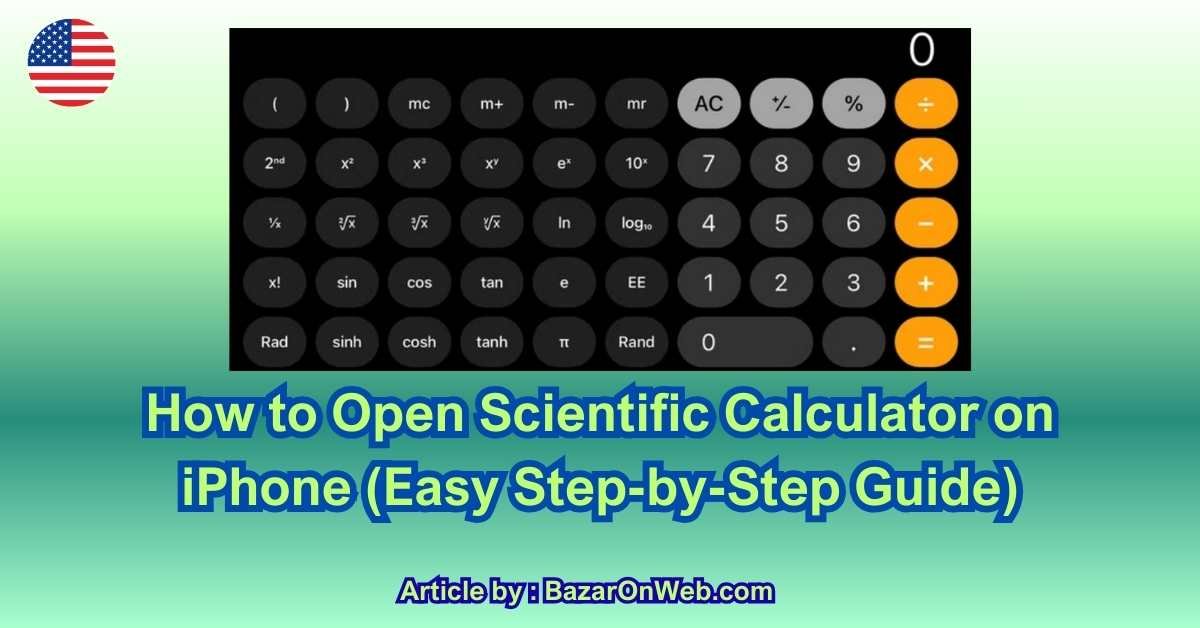
The scientific calculator on iPhone is an advanced version of the standard calculator that includes extra mathematical functions. Unlike the basic calculator view, the scientific mode offers operations such as sine, cosine, tangent, logarithms, exponents, factorials, square roots, and constants like π (pi).
This mode is especially helpful for students, professionals, and anyone who occasionally deals with formulas beyond simple addition or multiplication. Instead of cluttering the default interface, Apple keeps these advanced functions hidden until you need them. This design keeps the calculator clean for everyday use while still offering powerful tools when required.
Importantly, the scientific calculator is not a separate app. It’s built directly into Apple’s Calculator app. This means it’s already installed on your device, updated with iOS, and optimized for performance and accuracy.
Why You Can’t See Scientific Mode on iPhone
One of the most common reasons users think their iPhone doesn’t have a scientific calculator is because it only appears in landscape mode. If your phone is held vertically (portrait mode), you’ll only see the basic calculator layout.
Another issue could be screen rotation lock. If rotation is locked, the calculator won’t switch to scientific mode even when you turn your phone sideways. This small setting causes a lot of confusion, especially for first-time users.
Additionally, older users or those new to iPhones may simply not realize that orientation plays such a big role in unlocking advanced features. Apple rarely explains this inside the app, which is why many people overlook it entirely.
How to Open Scientific Calculator Using Landscape Mode
The simplest way to open the scientific calculator on iPhone is by rotating your device horizontally. First, open the Calculator app as you normally would. Then, turn your iPhone sideways into landscape orientation.
Instantly, you’ll notice the calculator interface expand. New buttons will appear on the left and right sides of the screen, including trigonometric functions, logarithms, powers, and constants. This expanded layout is the scientific calculator.
If nothing changes when you rotate your phone, check whether Portrait Orientation Lock is enabled in Control Center. Once it’s turned off, rotate your phone again, and the scientific calculator should appear immediately.
This method works on all modern iPhones running iOS and does not require any additional settings or downloads.
Scientific Calculator Features You Should Know About
Once scientific mode is active, your iPhone becomes a powerful math tool. You’ll find functions like sin, cos, tan for trigonometry, ln and log10 for logarithmic calculations, and x² or xʸ for exponent-based equations. There’s also a π button for quick access to pi and a factorial function for advanced math needs.
These tools are particularly useful for students preparing for exams, professionals working with measurements, or parents helping children with schoolwork. The layout may look intimidating at first, but each button is clearly labeled and easy to use with a bit of practice.
Apple’s scientific calculator is accurate, fast, and surprisingly comprehensive for a built-in tool.
When Scientific Calculator Won’t Open (Common Fixes)
If rotating your phone doesn’t activate scientific mode, start by checking screen rotation lock. Swipe down from the top-right corner to open Control Center and ensure the lock icon is disabled.
Also, make sure your iPhone is updated to a recent iOS version, as outdated software can sometimes cause UI issues. Restarting the Calculator app—or your phone—can also fix minor glitches.
In rare cases, accessibility settings or display zoom may affect layout behavior. Switching back to standard display settings usually resolves this issue.
Using Scientific Calculator Functions with Real Examples
Once you’ve opened the scientific calculator on your iPhone, the real value comes from knowing how to use its functions in practical situations. For example, if your child is learning trigonometry, you can quickly calculate sin, cos, or tan values by entering the angle and tapping the respective function. Engineers and professionals often rely on powers and roots, such as x² or √x, for quick estimations without opening laptops or spreadsheets. Even simple tasks like calculating compound growth or decay become easier using logarithmic functions like log and ln. What makes this especially convenient is that the calculator remembers the order of operations, so you can build complex equations step by step without confusion. Over time, these tools can replace the need for a physical scientific calculator entirely.
Advanced Buttons Most Users Ignore (But Shouldn’t)
Many users only scratch the surface of the scientific calculator and ignore some of its most powerful buttons. Functions like eˣ, 10ˣ, and xʸ are incredibly useful for exponential calculations, especially in finance, science, and analytics. The π button simplifies geometry and trigonometry calculations instantly, while the factorial function is essential for probability and combinatorics problems. There’s also a memory of previous calculations, allowing you to refine results rather than start from scratch. These features are designed to reduce friction and speed up problem-solving, making your iPhone a serious productivity tool rather than just a convenience.
Best Practices for Accuracy and Efficiency
To get the most accurate results, it’s important to follow a few best practices. Always double-check whether your calculator is in degrees or radians when working with trigonometric functions, as this can drastically change results. Take advantage of parentheses to clearly define complex expressions. If you make a mistake, you can swipe left or right on the number display to delete the last digit instead of clearing everything. These small habits make a big difference, especially when working under time pressure or helping students with homework where precision matters.
When to Use Third-Party Scientific Calculator Apps
While Apple’s built-in scientific calculator is powerful, some users may need even more advanced capabilities. Third-party apps can offer graphing tools, equation solvers, unit conversions, and history tracking across sessions. These are particularly useful for college students, researchers, or professionals working with complex mathematical models. However, for most everyday needs—school-level math, engineering basics, finance calculations, or quick checks—the native iPhone scientific calculator is more than sufficient. Choosing between built-in and third-party tools depends on how frequently and deeply you work with advanced mathematics.
Who Benefits the Most from Scientific Calculator on iPhone
The scientific calculator isn’t just for students or engineers. Parents use it to help with homework, business owners rely on it for quick financial calculations, and professionals use it during meetings or site visits. Even casual users benefit when calculating percentages, measurements, or technical values on the fly. Because it’s always available and doesn’t require an internet connection, it’s one of the most reliable tools on your iPhone. Once you get comfortable with it, you’ll likely wonder how you ever managed without it.
Conclusion
The scientific calculator on iPhone is one of those features that quietly delivers immense value once you know how to use it. What starts as a simple calculator instantly transforms into a powerful problem-solving tool with just a screen rotation. From students tackling math homework to professionals handling real-world calculations, this built-in feature eliminates the need for extra devices or apps in most cases.
What I love most is how Apple keeps things simple. You’re not overwhelmed unless you need advanced functions, and when you do, they’re right there—clearly labeled and easy to access. With a bit of practice, the scientific calculator becomes second nature, saving time and reducing friction in everyday tasks.
If you haven’t explored it yet, now is the perfect time. Rotate your iPhone, experiment with the functions, and see how capable your device really is. Sometimes, the most powerful tools are the ones already in your pocket.
Disclaimer
This article is for informational purposes only. Features and availability of the scientific calculator may vary slightly depending on iOS version and iPhone model.

- How to Fix “Unable to Initialize Windows App SDK” Error in Windows 11

- How to Fix “Try Again Later – Something Happened on Our End” Error in Microsoft Store

- What Are iPhone Background Sounds? Their Uses and How to Enable Them

- How to Run a Safety Check in Google Chrome and Protect Your Browser

- Samsung Phone’s Keyboard Not Working? Here’s How to Fix It

Products
-
![Apple Watch Ultra 3 [GPS + Cellular 49mm] Running & Multisport Smartwatch w/Rugged Titanium Case w/Black Titanium Milanese Loop - M. Satellite Communications, Advanced Health & Fitness Tracking](https://bazaronweb.com/retailstores/wp-content/uploads/2025/09/apple-watch-320x320.jpg) Apple Watch Ultra 3 [GPS + Cellular 49mm] Running & Multisport Smartwatch w/Rugged Titanium Case w/Black Titanium Milanese Loop - M. Satellite Communications, Advanced Health & Fitness Tracking
Apple Watch Ultra 3 [GPS + Cellular 49mm] Running & Multisport Smartwatch w/Rugged Titanium Case w/Black Titanium Milanese Loop - M. Satellite Communications, Advanced Health & Fitness Tracking
-
 Apple iPad mini (A17 Pro): Apple Intelligence, 8.3-inch Liquid Retina Display, 256GB, Wi-Fi 6E, 12MP Front/12MP Back Camera, Touch ID, All-Day Battery Life — Purple
-
 Apple AirPods Max Wireless Over-Ear Headphones, Active Noise Cancelling, Transparency Mode, Personalized Spatial Audio, Dolby Atmos, Bluetooth Headphones for iPhone – Space Gray
-
 Apple AirPods Pro 2 Wireless Earbuds, Active Noise Cancellation, Hearing Aid Feature, Bluetooth Headphones, Transparency, Personalized Spatial Audio, High-Fidelity Sound, H2 Chip, USB-C Charging
-
Home Garage 210 TC Cotton King Floral Fitted (Elastic) Bedsheet(Pack of 1, Grey)
Original price was: ₹999.00.₹299.00Current price is: ₹299.00.
Leave a Reply